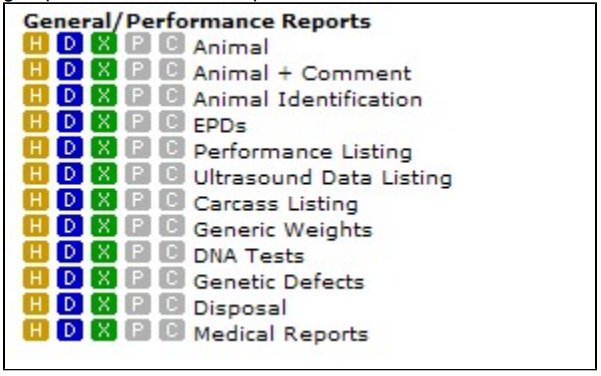
General/Performance Reports
Animal Reports are where you report information on multiple animals at one time. Typically, animal on the report are those in your active animal set. Those reports that do not print your currently active set are so noted. There are five output options which you can output your report. Not all reports have all output options though. Only non-grayed-out (colored) options are available for a given report.
Most Animal Reports are designed to fit on standard sized paper (either portrait or landscape).

Click on the colored-letter icon to print a specific report. All reports can be output to paper, but usually it is the HTML and PDF output types that are best suited for paper. These five Output Options include:
- HTML in browser: Creates a pop-up window in your browser (Firefox, Flock, Chrome, Internet Explorer, etc.). From this pop-up window you can review the report then close it or physically print it to paper. An HTML report will fit the size of window it is given. The larger the window, the less "row wrapping" will occur. You can vary the size of your report window to see how the column and rows sizes change dynamically.
- Word (doc): Creates a Microsoft Word Document which you can open directly with Word or save to your hard drive. This file is then editable, but any changes will not be saved in GEM.
- Excel (xls): Creates a Microsoft Excel Document which you can open directly with Excel or save to your hard drive. This file is then editable, but any changes will not be saved in GEM.
- Adobe Acrobat (pdf): Creates an Adobe Acrobat file which you can open directly with Acrobat Reader and save to your hard drive. This file type is usually reserved for more complicated report formats such as sale catalogs or invoices. This file is only editable, but only with Adobe Photoshop or a similar program.
- Comma-separated values (csv): Comma-separated (actually in some cases these are tab-delimited and sometimes space-delimited or fixed format) files are generally used to send specific data to your breed association. You should save this file type directly to your hard drive from this report line. Then you email the file to your association. You can look at these files with Microsoft Notepad or Wordpad, but should never save the file after opening it. Generally, these files are very difficult to understand, since they are designed to be opened by a computer at your association.
Nearly all GEM HTML animal reports can be sorted by clicking on the column heading to sort ascending and clicking a second time to sort descending. You can also sort by multiple columns by clicking first one column heading then another. For example, you wish to sort you animal list by sex then birth date within sex. You would first click on the birth date column, then secondly click on the sex column. Thus, you would click the columns in the reverse order you wish to sort.
The overall design or usage of animal reports are nearly identical to people reports.
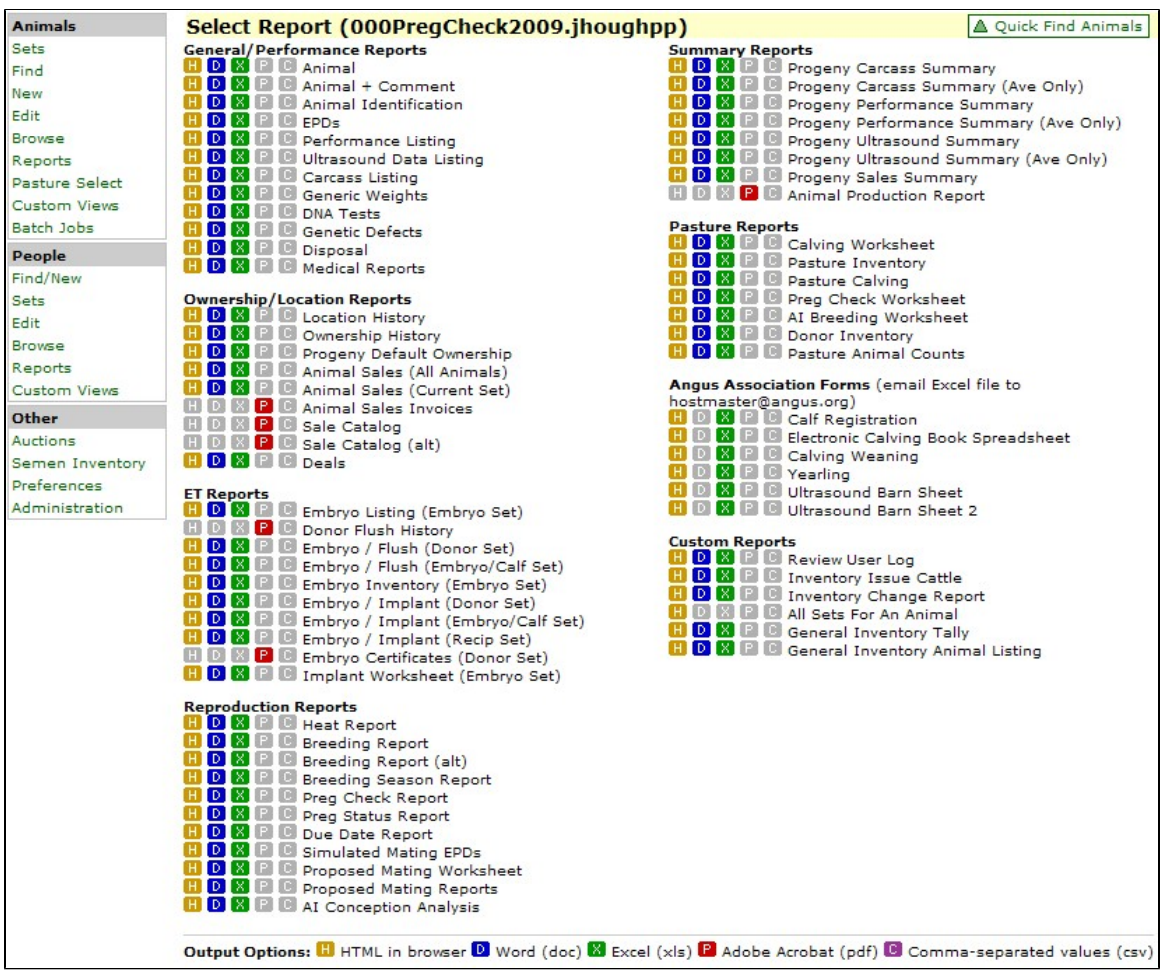
General-Performance Reports
The General/Performance Reports section contains animal reports that would be used on a daily basis. The report name describes the general group of information the report contains.
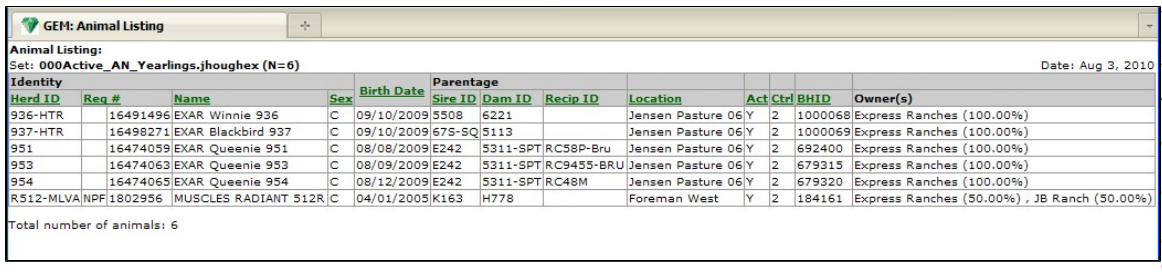
Animal Report
The Animal Report is probably the most often used report in GEM. It shows general descriptive information about the animals in your set.
Click on any of the green column headings to sort on that column. Ctrl is the GEM ID of the controller of that animal. BHID is the number in which GEM keeps track of all animals.
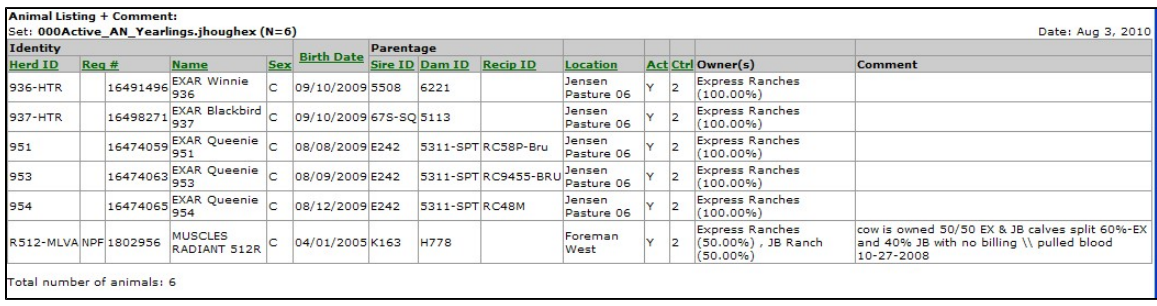
Animal + Comment Report
The Animal + Comment Report is very similar to the Animal Report. The report contains animal descriptive information plus the animal's main comment column. The main animal comment can be added and edited via the Base Animal Edit Screen.
Animal Identification Report
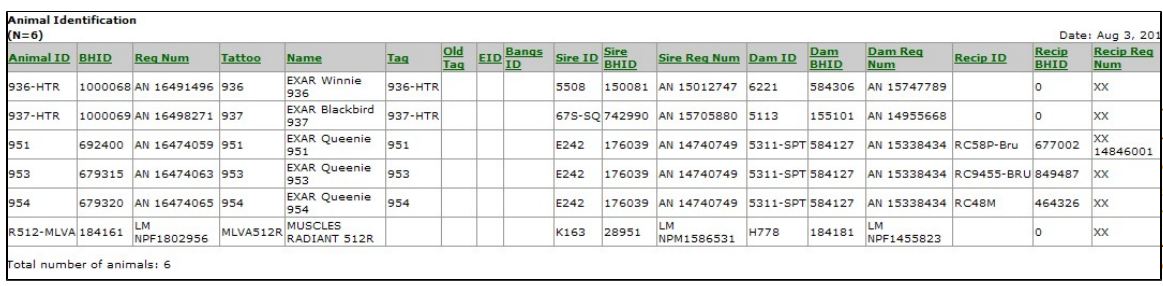
An animal can have lots of different forms of identification. The Animal Identification Report lists most of the main forms of identification for an animal.
EPDs Reports
There are several types of EPD Reports, depending on what specific information you wish to report. After you click the H, D or X link, you will get an intermediate pop-up window. In this popup window, you need to choose your breed association and the type of EPD Report you wish to see. Since all breeds have a slightly different set of EPDs, you must first choose the association. Your default breed will be the default association for this report.
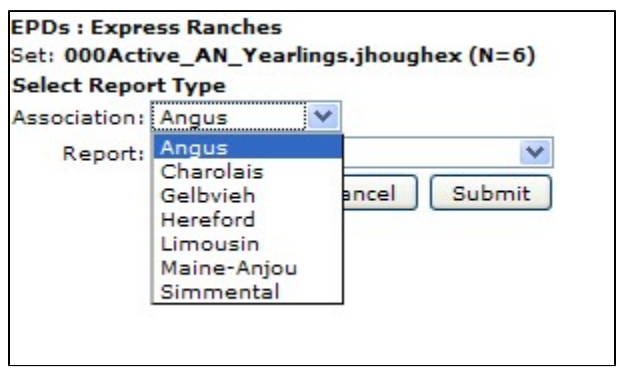
Secondly, you must choose the type of EPD Report you wish to print:
- EPDs Only
- EPDs & Acc: EPDs plus Accuracy values.
- EPDs, Acc & Pctl: EPDs plus Accuracy values plus Percentile Breakdown Level.
- EPDs (GEM Pedigree Estimates): Average of the sire and dam's EPDs when Association EPDs are missing.
- EPD Change: Current and prior EPDs and their difference.
EPDs Only Report
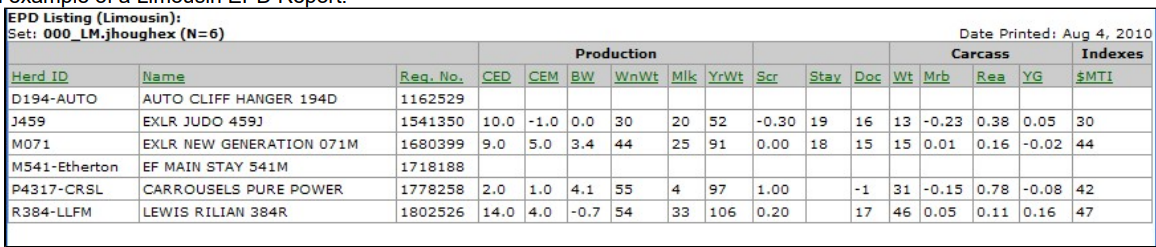
The EPDs Only Report prints one line per animal with EPDs utilized by the association you chose.
Below is an example of a Angus EPD Report.

Below is an example of a Limousin EPD Report.
EPDs & Acc Report
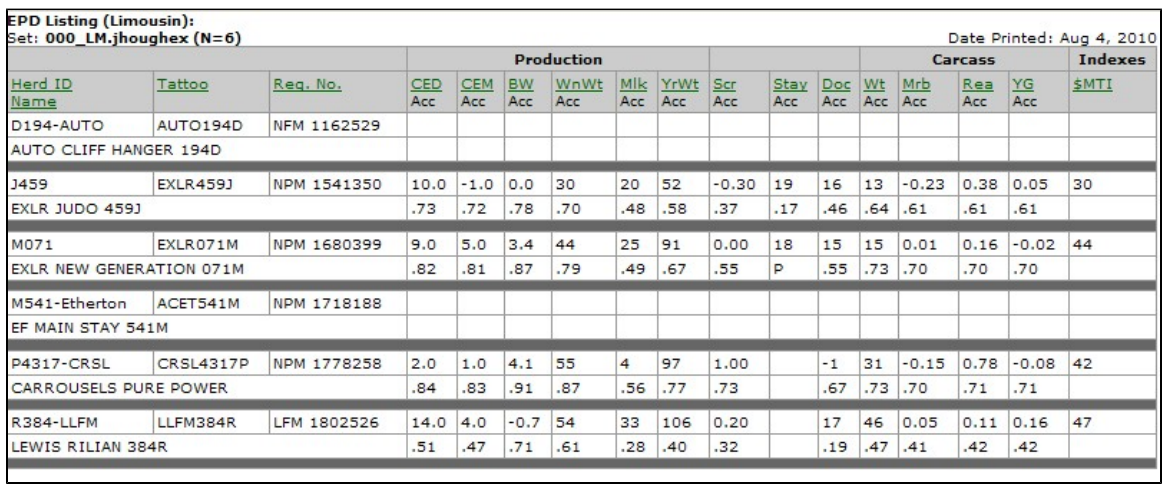
The EPDs & Acc Report lists information on two lines per animal. All columns are sortable, except accuracy values.
EPDs, Acc & Pctl Report
The EPDs, Acc & Pctl Report prints EPDs and Accuracy values and Percentile Breakdown Levels on a three-line per animal report. Percentile Breakdown Levels are generated by each association and indicate the animal's relative rank in it's population. All columns are sortable except accuracy and percentile breakdown levels.
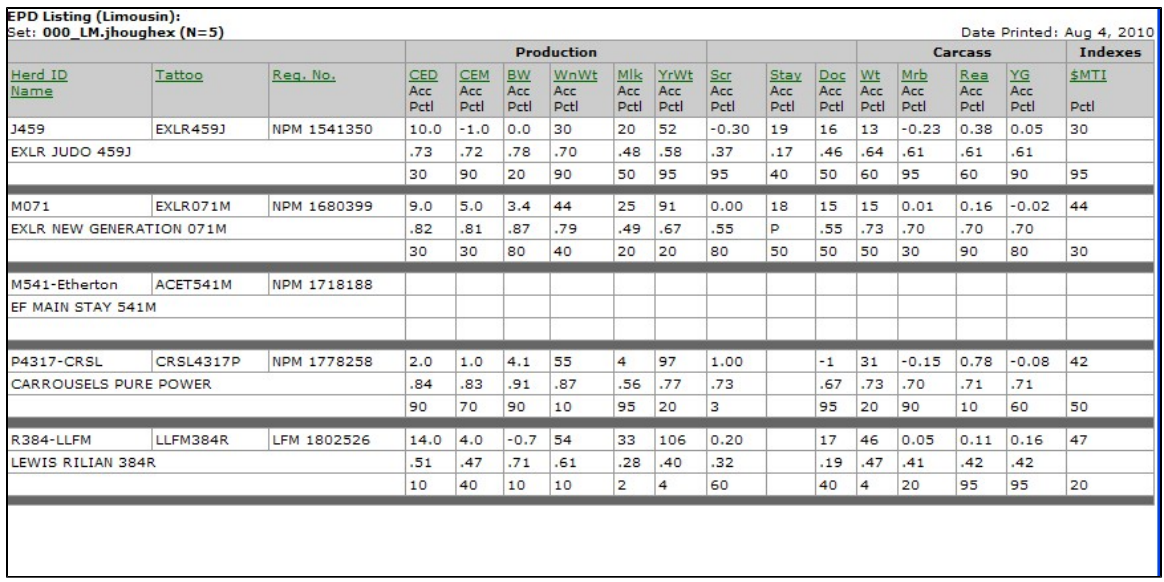
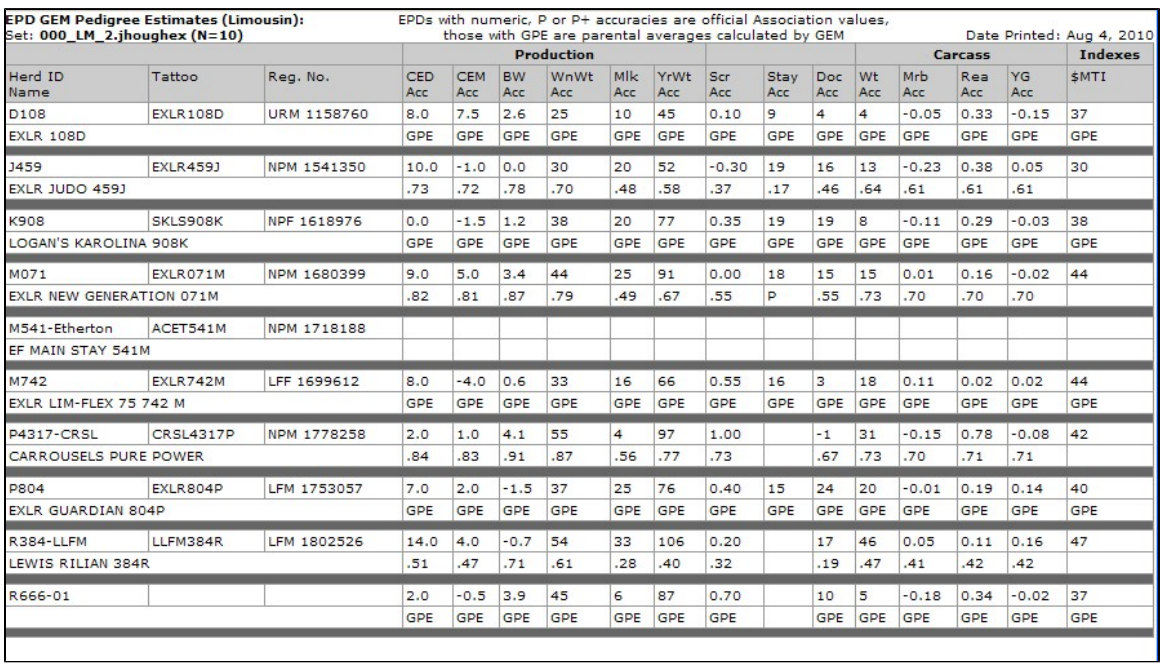
EPDs (GEM Pedigree Estimates) Report
The EPDs (GEM Pedigree Estimates) Report is a two-line per animal report. A GEM Pedigree Estimate is the average of the sire and dam's EPDs and is only calculated when Association EPDs are missing.
EPDs with numeric, P or P+ accuracies are official Association values, while those with a GPE accuracy are parental averages calculated by GEM. GEM Pedigree Estimates are official association EPDs. If one or both parent's EPD is missing, a GEM Pedigree Estimate can not be not calculated. In some cases, an animal can have an association EPD (numeric, P or P+ accuracy) for one trait and a GEM Pedigree Estimate (GPE accuracy) for another.
Because of the report design, columns are not sortable.
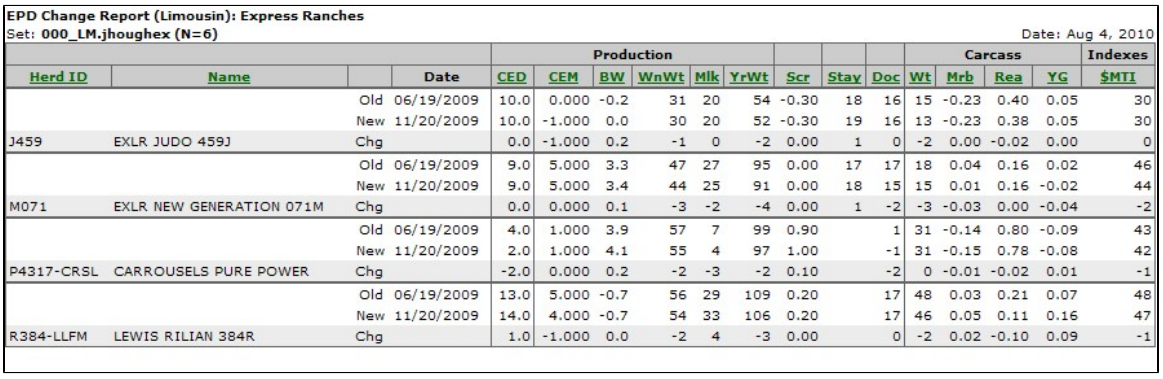
EPD Change Report
The EPD Change Report prints Current and Prior EPDs and their difference. Prior EPDs are those generated in a previous genetic analysis by your breed association. If either a current or prior EPD does not exist, no change can be calculated.
Beginning in August 2010, GEM has started storing multiple "generations" of prior EPDs. This means, for example, both last year's Spring and Fall EPDs are stored or actually any time an EPD is changed in GEM. It is possible an older animal would have several generations of prior EPDs. Also, the Angus Association will soon begin calculating new EPDs on a weekly basis. If you download new EPDs from AAA every single week, it is possible to have 52 prior Angus EPDs for a given year.
The intermediate screen for EPD Change allows you to choose the date range of the prior EPDs you want to compare.
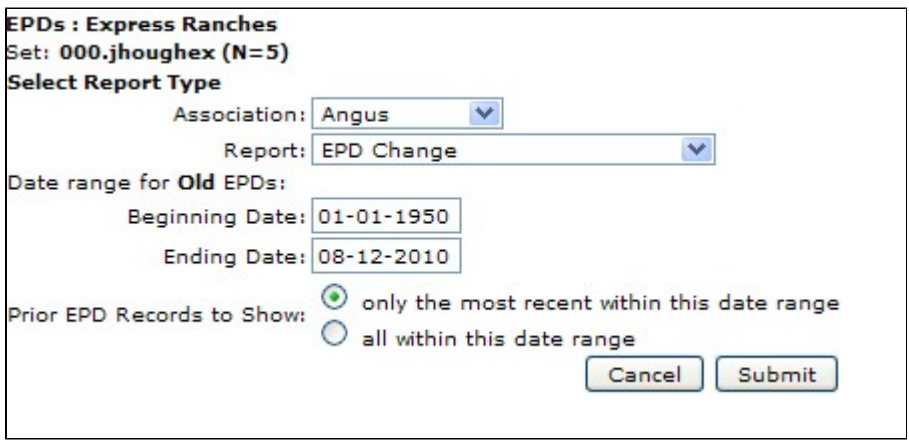
All columns are sortable. When you click and EPD column, the difference (change) between current and prior EPDs is what is used to sort.
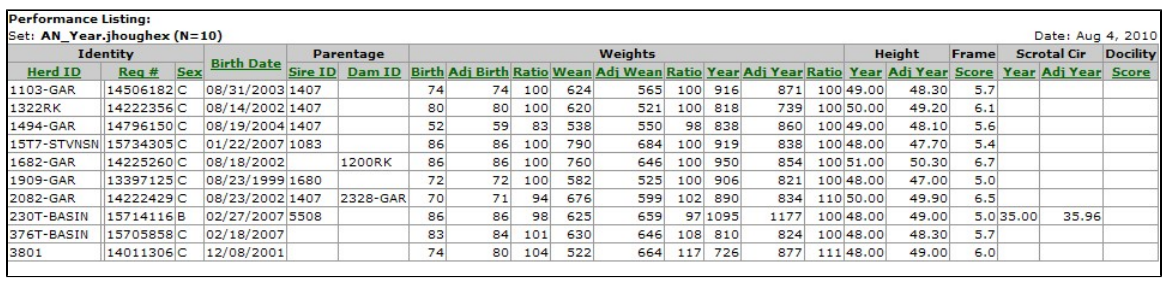
Performance Listing
The Performance Listing Report lists Actual, Adjusted and Ratios for the most common performance measurements.
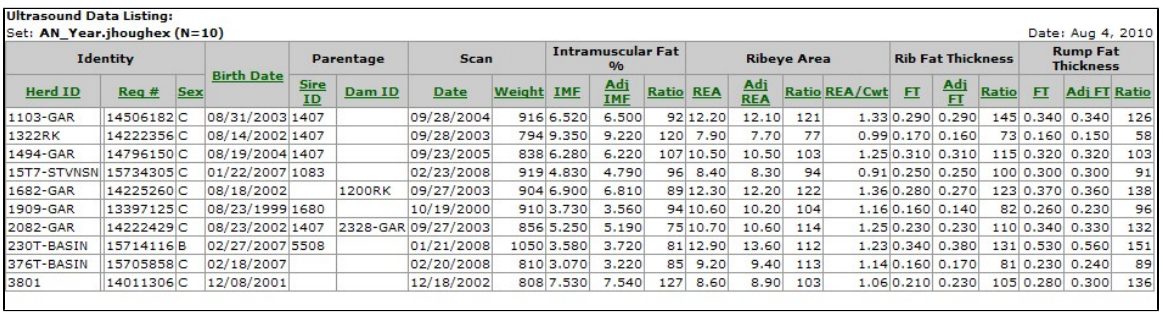
Ultrasound Data Listing
The Ultrasound Data Listing Report lists Actual, Adjusted Measurements and Ratios for Ultrasound carcass traits.
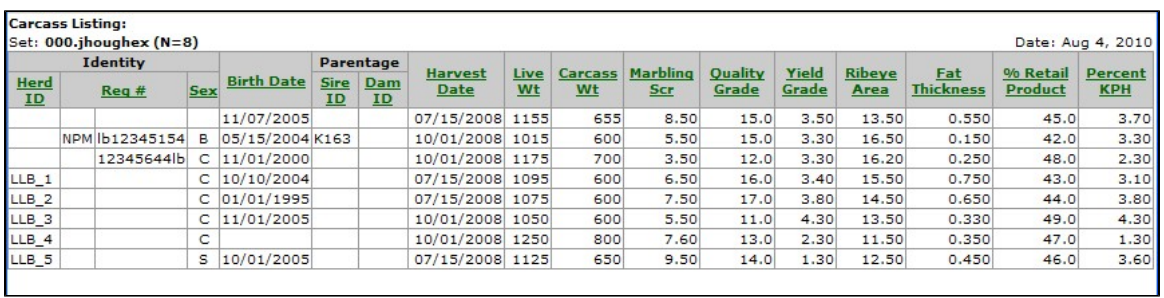
Carcass Listing
The Carcass Listing Report lists actual (packing plant) carcass data.
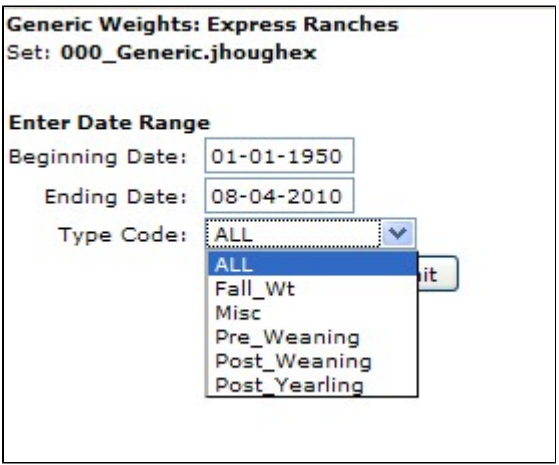
Generic Weights Report
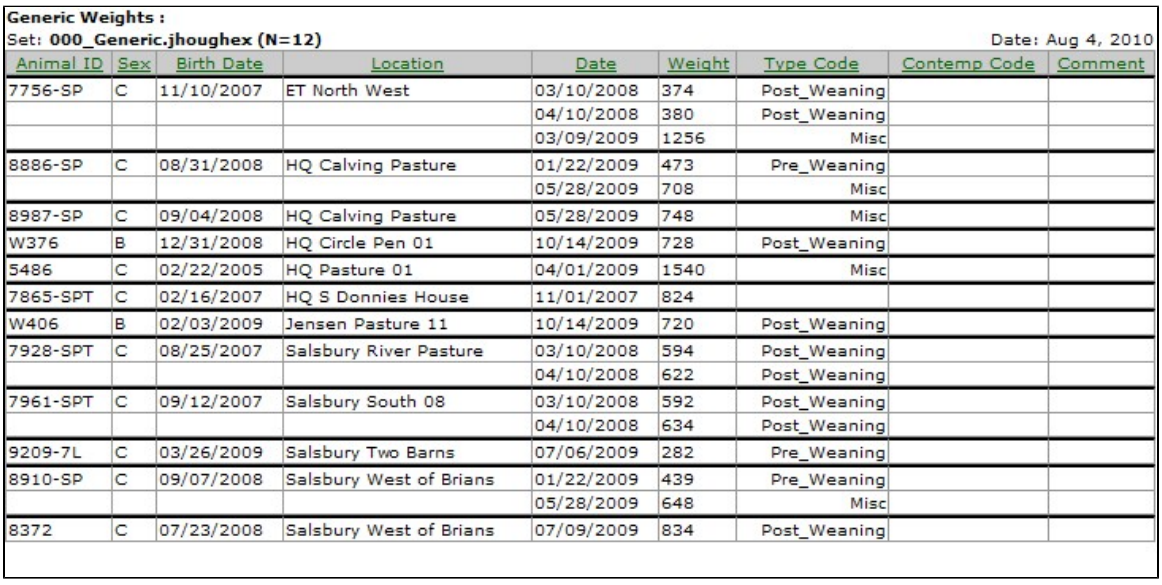
The Generic Weights Report Report lists weight data taken at non-standard times (not Birth, Weaning or Yearling). In the intermediate screen for this report, you can choose a date range for when the weights were taken and the categories of the trait. Categories include Fall Weight, Miscellaneous, Pre-Weaning, Post-Weaning, Post-Yearling and All.
This report can be sorted by any column. When sorting by Animal ID (default), Sex, Birth Date or Location, that information not repeated on the left-hand half of the report.
DNA Tests Report
DNA Tests Reports are divided into three different reports as the choices indicate. Currently, data comes from two independent DNA labs, so the information and reports are also independent.
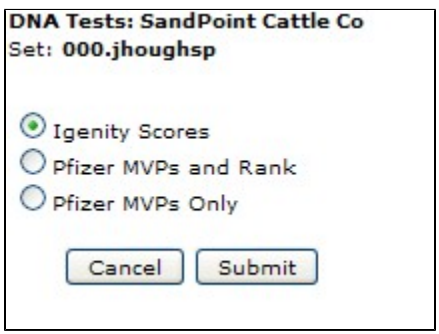
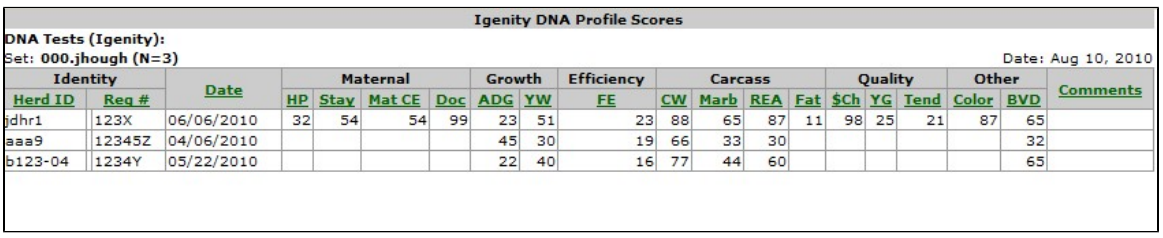
Igenity Scores
This is the one-line per animal Igenity Profile Scores Report.
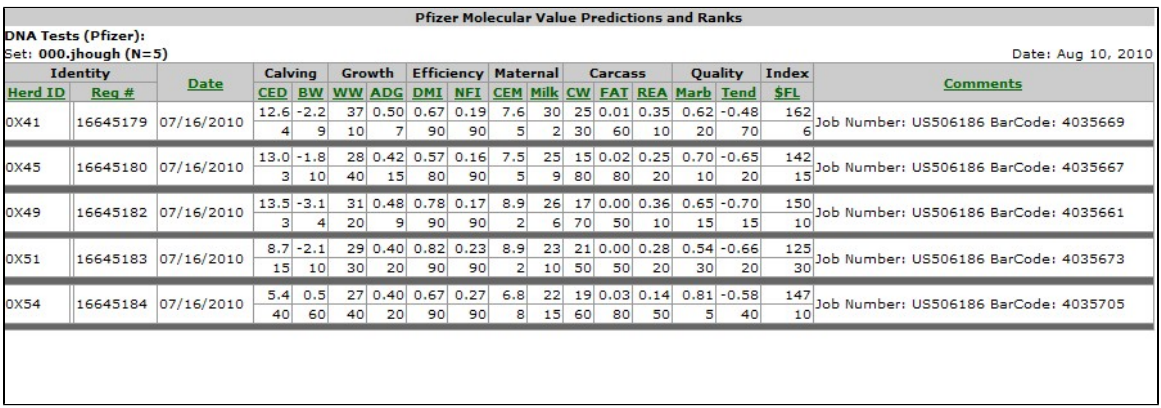
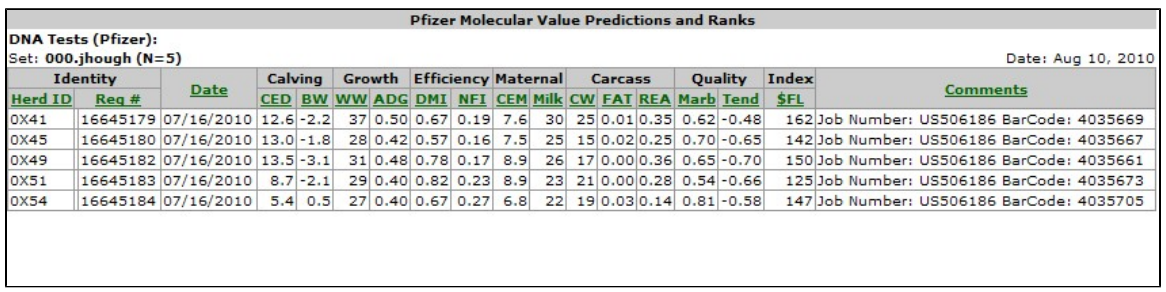
Pfizer MVPs and Rank
This is the two-lines per animal Pfizer MVPs and Rank Report.
Pfizer MVPs Only
This is the one-line per animal Pfizer MVPs Only Report (no Rank values are listed).
Genetic Defects Report
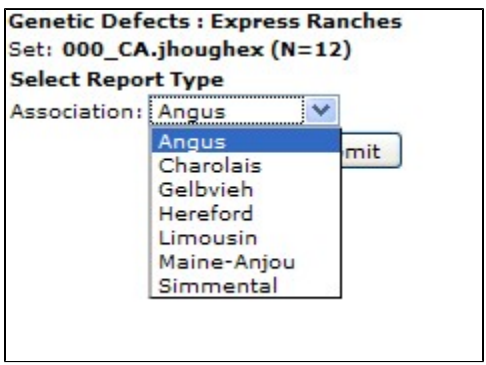
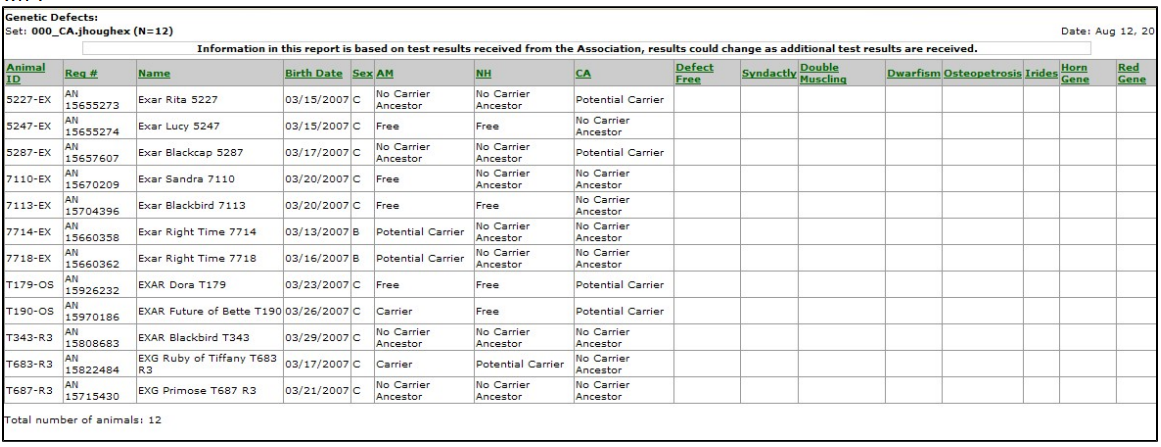
The Genetic Defects Report lists the defect status of a given set of genetic defects. Each breed association has a different set of genetic defects, thus you must choose the relative breed in the intermediate screen.
Most breed associations have a "Free" or "Carrier" status and others have additional status values of "No Carrier Ancestor", "Potential Carrier", and "Unknown".
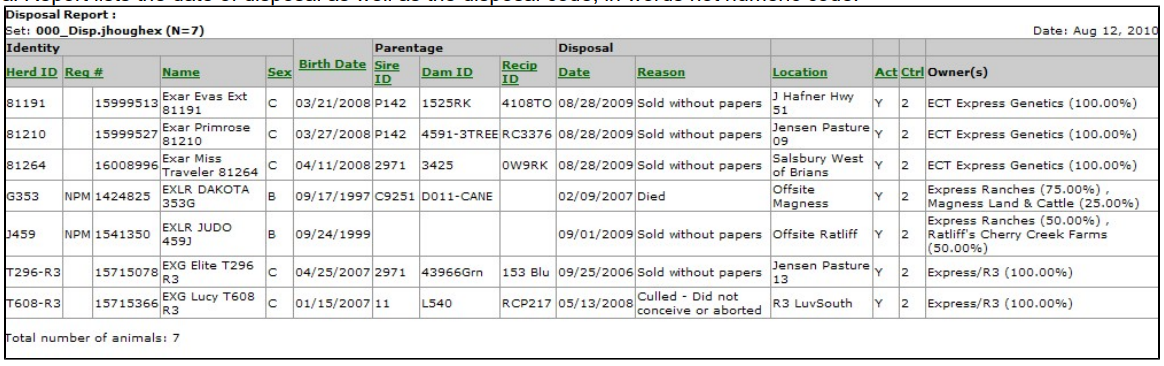
Disposal Report
The Disposal Report lists the date of disposal as well as the disposal code, in words not numeric code.
Medical Report
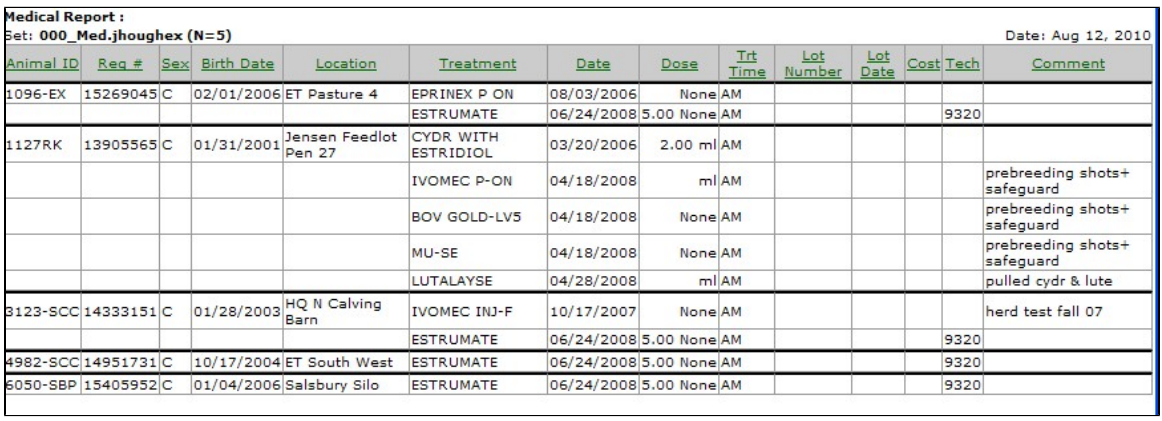
The Medical Report lists all medical treatments within a given date range and for the treatment(s) you choose.
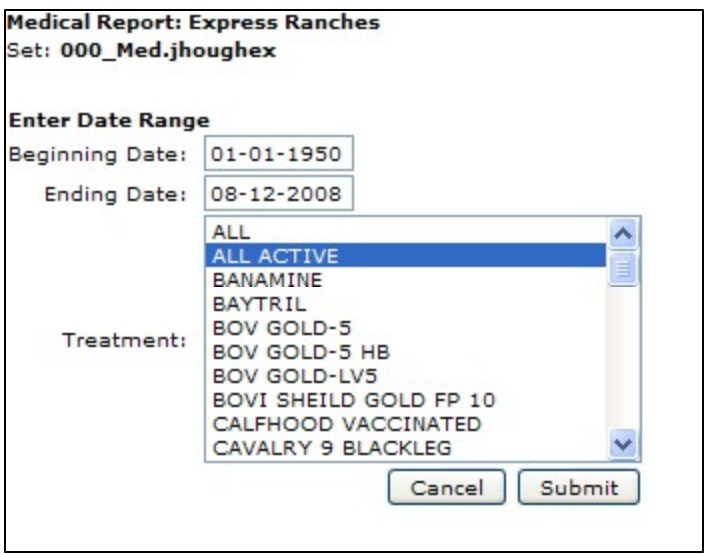
The intermediate screen allows you to choose the date range and treatment(s) you are interested in reporting. Note the treatment choice menu is a multiple choice drop down menu in which you can pick one or several treatments. You can use the Ctrl + Left Mouse click to pick and choose different treatments at random. To choose a group of treatments all together you can use Shift + Left Mouse Click.
Reports - Animals
Animal Reports are where you report information on multiple animals at one time. Typically, animal on the report are those in your active animal set. Those reports that do not print your currently active set are so noted. There are five output options which you can output your report. Not all reports have all output options though. Only non-grayed-out (colored) options are available for a given report.
Ownership/Location Reports
The Ownership / Location Reports section contains animal reports that would be used describing location or ownership information. The report name describes the general group of information the report contains.